
Server logs, ingest and security monitoring
Use this hub to choose the right log source, understand SEO daily collection vs realtime security monitoring, upload files manually and read bot, SEO and security reports.
Server Logs is a mini-cluster, not one giant setup page
SEOMER can ingest logs from a VPS agent, WordPress plugin, gateway source or manual upload. SEO log monitoring is the regular package-based mode, usually collected daily. Security monitoring is a separate realtime option that sends access and error logs every 5 minutes and powers Security Center alerts, findings and heartbeat.
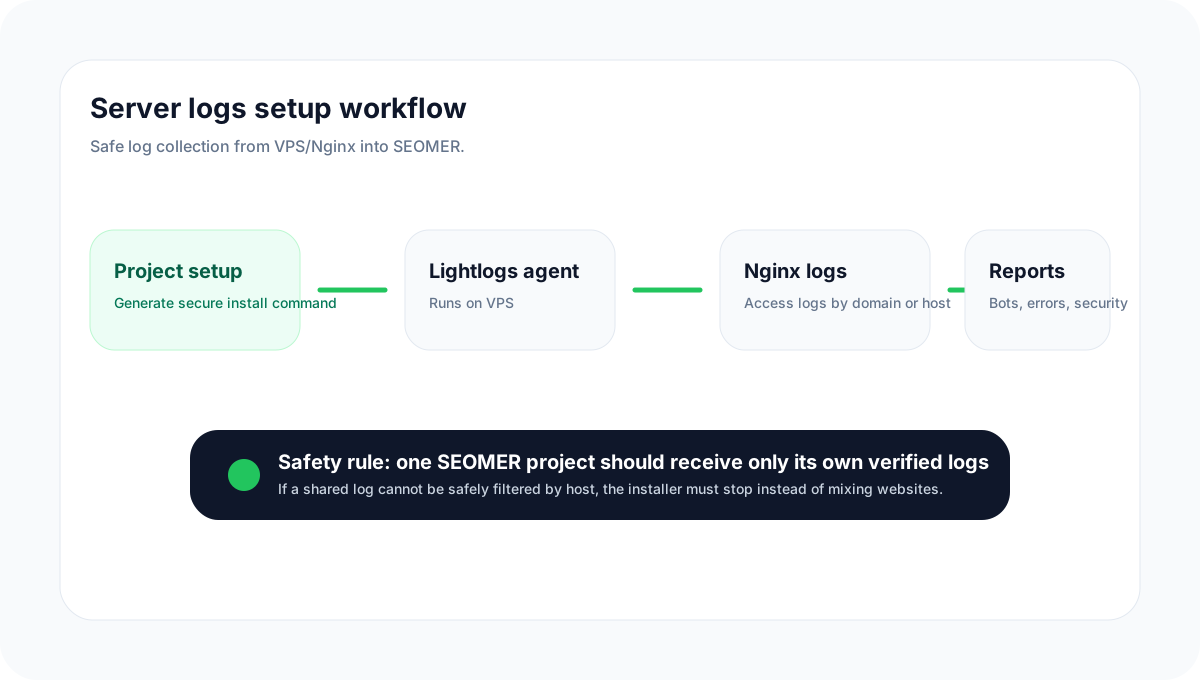
Server logs workflow
The log cluster starts with a source, runs through parsing and dedupe, then powers Imports, Entries, Security Center and Reports.
Concept diagram. UI screenshots should be added to the individual setup pages.
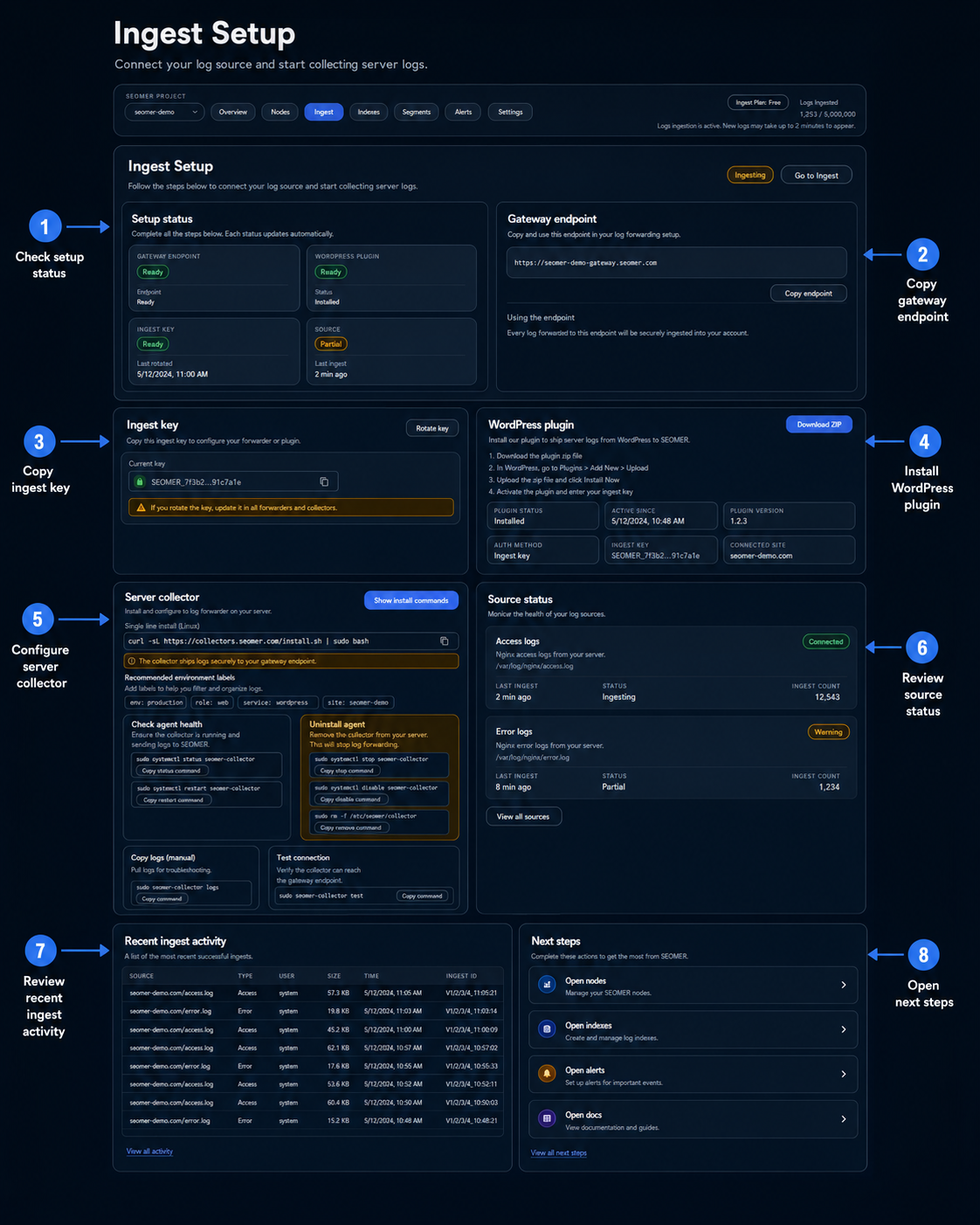
Ingest Setup overview
This annotated setup screen shows how users connect logs through a gateway endpoint, ingest key, WordPress plugin or server collector before reviewing source status.
Use this image on the cluster overview as a visual map of the log setup workflow.
Understand the log workflow before setup
Start here when you are not sure whether to use the VPS agent, WordPress plugin or manual uploads.
Choose the right ingest source
SEOMER supports several ways to bring logs into a project. The best source depends on where the site is hosted and how much access the user has.
- None
VPS agent
Best for Nginx sites on a VPS. The generated command installs or updates the Lightlogs agent, detects safe access/error log paths and sends only the correct project source.
- None
WordPress plugin
Best when the user manages the site through WordPress admin and can install a plugin ZIP. The plugin uses the same gateway endpoint and ingest key as other sources.
- None
Manual upload
Best for one-off analysis, historical files, testing, or users who cannot install server-side collectors yet.
- None
SEO daily logs vs realtime security logs
SEOMER has two collection modes for logs. SEO daily logs are the regular package-based monitoring mode. Realtime security logs are a separate option and are not included in base packages.
- None
SEO daily logs
Used for crawl diagnostics, Googlebot visibility, AI bot discovery, heatmaps, SEO Health and periodic reports. The current runtime is designed around a daily batch when security realtime is not active.
- None
Security realtime logs
Used for Security Center. Collectors send logs every 5 minutes, detect suspicious traffic faster and feed security findings, source health, attack timeline and heartbeat.
- None
Only one active collection stream
When security realtime is active, SEO reports reuse the same 5-minute stream. SEO daily collection is blocked to avoid duplicate collection and double-counted data.
- None
What SEOMER detects in logs
Parsed access logs let SEOMER classify traffic, detect crawler families, verify trusted bots and highlight suspicious patterns.
- Humans and pageview-like traffic
- Googlebot, GoogleOther and Google Inspection Tool
- Bingbot, YandexBot, DuckDuckBot, Baiduspider, Sogou and PetalBot
- AI crawlers such as GPTBot, OAI-SearchBot, ChatGPT-User, ClaudeBot, PerplexityBot and related user agents
- SEO crawlers such as Ahrefs, Semrush, Majestic and similar tools
- Uptime and monitoring bots
- Suspicious probes, brute-force attempts, .git/phpunit/xmlrpc/admin scans and server error bursts
None
- None
Where to read log data in the app
The Logs & Security section is split into focused pages so users can troubleshoot setup, watch imports, inspect raw entries and open reports without getting lost.
- None
Setup
Generate ingest keys, download the WordPress plugin, generate VPS install commands, inspect source health and recent activity.
- None
Imports
Watch uploads in near real time, storage usage, duplicate handling, inserted rows, malformed lines, source method and processing status.
- None
Entries
Inspect parsed rows, filter by humans/bots/status, and export rows for deeper analysis.
- None
Security
Monitor realtime security source health, suspicious hits, top offenders, findings, incidents and heartbeat.
- None
Reports
Open Live Overview, Bot & Visitor Journey, SEO Health, Traffic Heatmap and export packages.
- None
Screenshots needed for this cluster
The docs pages contain screenshot placeholders. Add cropped screenshots only where a user needs to recognize a button, form or status card.
- Setup page: ingest key, gateway endpoint, WordPress plugin card and VPS install command card
- Imports page: storage usage, stream status, live uploads table and rows counters
- Security page: monitoring mode, source health, heartbeat, findings and top offenders
- Reports hub: report cards, export builder and prepared package buttons
- Bot & Visitor Journey: verified/fake Googlebot filters and actor table
None
- None
Security logs are a separate realtime option
SEO daily log monitoring belongs to regular packages. Security log monitoring is a separate paid option because it collects and analyzes access/error logs every 5 minutes.
- SEO mode: daily or long-interval batches
- Security mode: realtime every 5 minutes
- Realtime security covers SEO reports while active
Continue through the Server Logs cluster
Use these pages in order: overview, source setup, imports, security, reports.
Server logs overview
Start here to understand sources, modes, imports, reports and security monitoring.
VPS agent setup
Install the Lightlogs agent on a VPS and safely detect Nginx access/error logs.
WordPress plugin setup
Install the plugin ZIP in WordPress and connect it to SEOMER with the gateway endpoint and ingest key.
Manual log uploads
Upload Nginx access or error files manually and check parsing, dedupe and storage usage.
Security log monitoring
Use realtime security monitoring every 5 minutes as a separate paid option.
Log reports
Read Live Overview, Bot & Visitor Journey, SEO Health, Heatmap and export packs.
Should users start with VPS agent, WordPress plugin or manual upload? +
Use the VPS agent for Nginx sites on a VPS, the WordPress plugin for WordPress-admin setup, and manual upload for historical files or quick one-off analysis.
Are security logs included in regular packages? +
No. Regular package monitoring covers SEO daily logs. Security monitoring is a separate realtime option that checks every 5 minutes.
Can SEO daily and security realtime run together? +
When security realtime is active, SEO reports reuse the same realtime stream. The separate SEO daily mode is blocked to avoid duplicate collection.
Which log type matters most for SEO? +
Nginx access logs are the primary source because they contain requests, URLs, status codes and user agents.
Does SEOMER verify bots? +
Yes. Known crawler claims can be checked using verification logic such as reverse DNS / forward DNS or trusted IP range checks where supported.
Build log monitoring from the right source
Start with the overview, then connect a VPS agent or WordPress plugin and verify imports before enabling reports or realtime security.