
Monitor security logs every 5 minutes
Security monitoring uses realtime log collection to detect suspicious traffic, attack bursts, server errors, source gaps, top offenders and incidents faster than daily SEO log batches.
Security monitoring is separate from package-based SEO logs
SEO daily logs are for crawl and bot visibility. Security logs are a realtime add-on: collectors send access and error logs every 5 minutes and Security Center turns them into source health, attack timeline, findings, top offenders and incident data.
Use realtime security monitoring
Security Center is for live-ish operational visibility, not only SEO crawl diagnostics.
SEO daily mode vs security realtime mode
The runtime has separate consumers. SEO is a daily/batch consumer by default. Security is a realtime consumer with a 300-second target interval. If security is enabled, SEO daily collection is disabled because SEO reports can use the same realtime stream.
- None
SEO daily mode: 24h interval
Security realtime mode: 300 seconds / 5 minutes
None
- None
Enable security monitoring
Open Logs & Security and use the monitoring action or Security page controls. After enabling, collectors should switch to realtime mode and source health should show expected next uploads around the 5-minute rhythm.
- None
None
- None
How to read Security Center
Security Center groups operational signals into cards and tables so users do not need to scan raw logs manually.
- None
Security status
High-level health based on source lag, findings, events and server errors.
- None
Source health
Shows plugin/server/gateway source, last received time, next expected time, lag, missed intervals and failures.
- None
Heartbeat
A compact timeline: green means calm, yellow means suspicious, red means trouble and gray means a blind spot.
- None
Top offenders
IP addresses and paths responsible for suspicious patterns.
- None
What findings can represent
Findings can come from brute-force attempts, suspicious bots, admin scans, WordPress probes, .git/phpunit/xmlrpc paths, blocked bursts and server error spikes.
- None
None
- None
Billing and limits note
Security monitoring is not part of regular SEO log packages. Because it collects and analyzes logs every 5 minutes, it should be presented as a separate paid option with clear UI warnings before enabling.
- None
None
- None
Security Center overview
Security Center tracks security status, monitoring filters, source health, heartbeat, findings, top offender IPs and attacked paths.
Security monitoring is a separate realtime option, so the docs should make its status and health checks obvious.
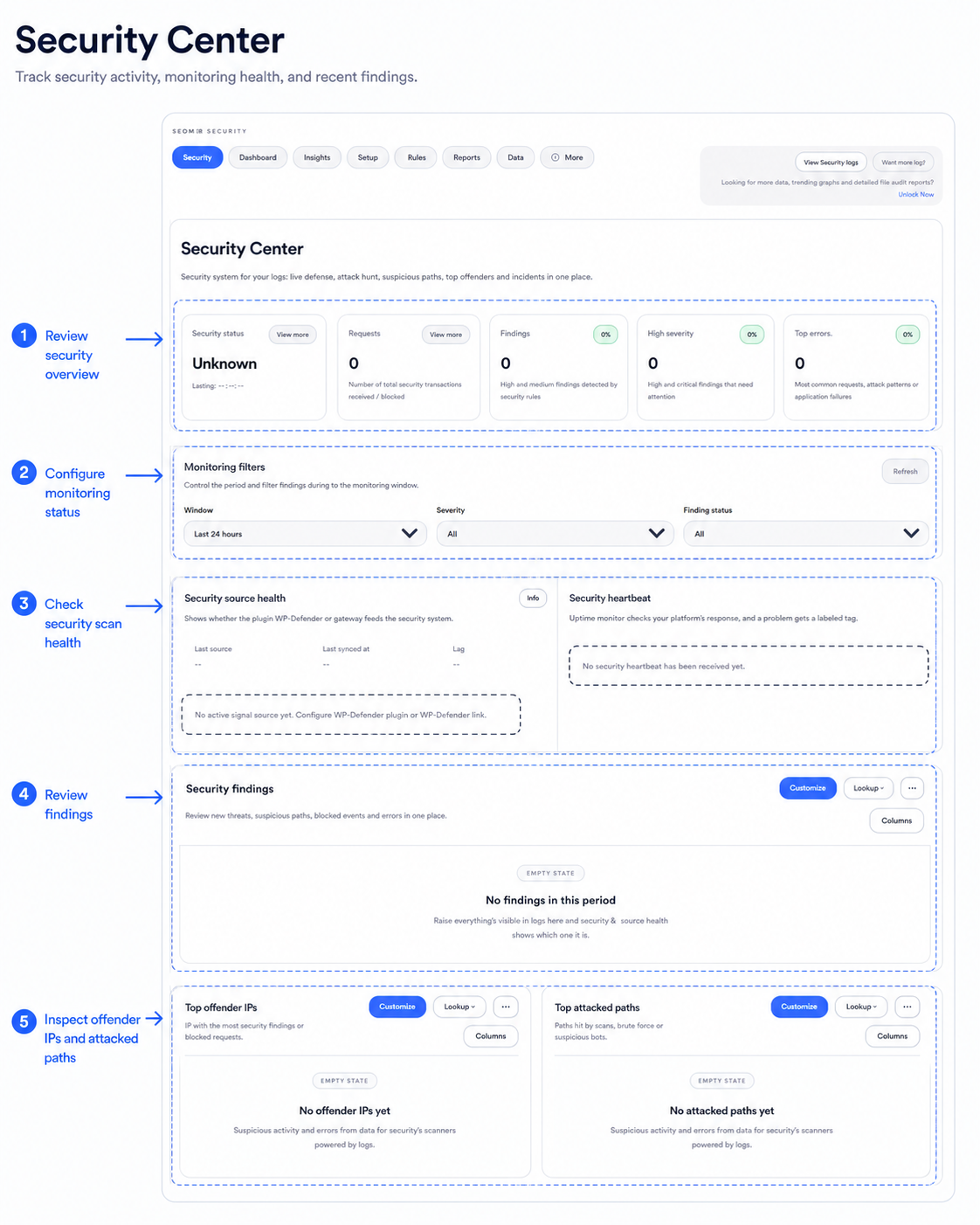
Security findings and heartbeat
Use this view to confirm whether the security stream is healthy and whether findings, offender IPs or attacked paths need review.
The public documentation image uses sample data. Real IPs should stay anonymized in future screenshots.
Realtime security should be explicit before activation
The UI and docs should make clear that this option is separate from included SEO daily logs. Users should know they are enabling a faster 5-minute security stream.
- SEO daily logs: package-based
- Security logs: separate option
- Realtime interval: 5 minutes
Continue with reports and imports
Security data becomes clearer when source health and imports are clean.
Server logs overview
Start here to understand sources, modes, imports, reports and security monitoring.
VPS agent setup
Install the Lightlogs agent on a VPS and safely detect Nginx access/error logs.
WordPress plugin setup
Install the plugin ZIP in WordPress and connect it to SEOMER with the gateway endpoint and ingest key.
Manual log uploads
Upload Nginx access or error files manually and check parsing, dedupe and storage usage.
Security log monitoring
Use realtime security monitoring every 5 minutes as a separate paid option.
Log reports
Read Live Overview, Bot & Visitor Journey, SEO Health, Heatmap and export packs.
How often does security monitoring collect logs? +
The realtime security mode is designed around a 5-minute interval.
Is security monitoring included in standard packages? +
No. It should be treated as a separate paid option because it uses more frequent collection and analysis.
What happens to SEO daily logs when security is active? +
SEO daily collection is blocked because SEO reports can use the same realtime stream created by security mode.
Can Security Center detect fake bots? +
It can flag suspicious or unverified crawler claims and use bot verification where supported.
Should screenshots show IP addresses? +
For public docs, anonymize IP addresses and private paths before publishing screenshots.
Enable realtime security only when the user understands the cost
Security logs are powerful, but they should be documented as a separate add-on with clear setup, interval and source-health checks.