
Quick answer
Google Search Console data needs context because clicks, impressions, CTR and average position show what happened in Google Search, but they rarely explain why it happened. GSC data is delayed, aggregated and separated from the website changes, crawler signals, SERP movement and traffic behavior that usually explain the real cause.
SEOMER connects GSC with real-time monitoring, crawler checks, SERP tracking, page changes, indexation signals and reports. This helps SEO teams understand the full chain: what changed on the website, how Google interpreted it, how rankings reacted, and what should be improved next.
- Compare delayed GSC metrics with live SERP movement.
- Map pages to the queries Google actually associates with them.
- Connect clicks and impressions with page changes, crawling and indexation.
- Use GSC as part of a connected SEO workflow, not as an isolated report.
What Google Search Console actually shows
Google Search Console is one of the most valuable SEO data sources because it shows how a website appears in Google Search. It gives teams access to clicks, impressions, CTR, average position, queries, pages, countries, devices and basic indexing information.
That data is useful because it comes from Google itself. It can show which pages receive impressions, which queries trigger those pages, how often users click, and whether search visibility is moving up or down over time.
But GSC is not a full SEO decision system. It shows search performance data, not the full operational context around that data.
Core idea
GSC is strongest when it is used as a signal inside a connected workflow. On its own, it shows metrics. Connected with crawling, SERP monitoring, page changes and traffic data, it starts explaining cause and effect.
Why GSC data alone is not enough
GSC can tell you that impressions dropped. It can show that average position changed. It can show that a page started receiving queries you did not expect. But it usually does not tell you what caused the change.
That is the main problem. SEO decisions require context.
If impressions fall, the reason may be technical, content-related, competitive, seasonal, indexing-related or caused by a change in search intent. GSC shows the result, but the investigation needs more signals.
Questions GSC does not answer clearly by itself
- Did the page title, description or content change before the drop?
- Did Google start ranking the page for a different query group?
- Did the page lose positions in the live SERP?
- Did a crawler detect broken pages, redirects or technical issues?
- Did the page fall out of the index or become harder to crawl?
- Did competitors update their content or create stronger pages?
This is why SEOMER treats GSC data as part of a broader SEO tools workspace, not as a standalone dashboard.
The delay problem
Google Search Console data is not real-time. In many cases, teams see performance changes after a delay. That delay is normal for GSC, but it creates a practical problem for SEO work: by the time a drop appears clearly, the issue may already have been active for hours or days.
For reporting, this delay is acceptable. For monitoring and fast reaction, it is not enough.
Important fact
When GSC finally shows a visibility drop, the original cause may have happened earlier: a deployment, a content change, a crawl issue, a redirect mistake, a competitor update or an indexing problem.
SEOMER helps reduce this blind spot by connecting GSC with faster signals. If SERP positions shift, a crawler detects changes, uptime drops, or logs show errors, the team can start investigating before waiting for GSC to fully catch up.
SERP vs GSC: why both matter
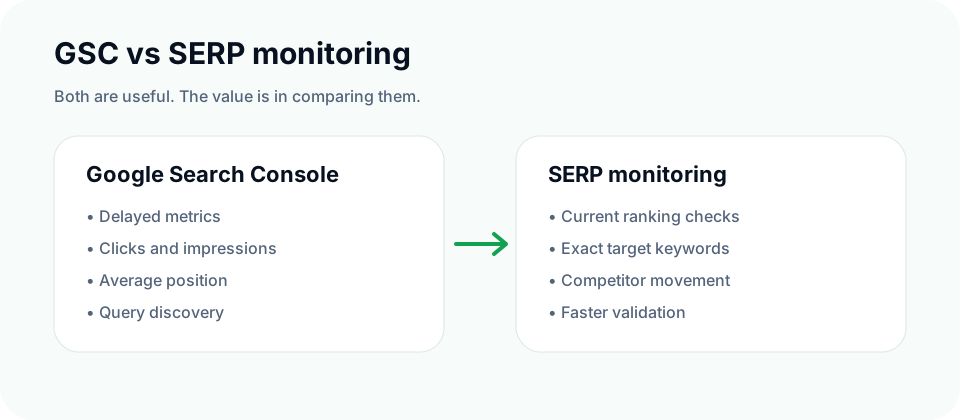
GSC and SERP monitoring answer different questions.
GSC tells you how your site performed in Google Search across real impressions and clicks. SERP monitoring shows where your pages appear for selected keywords at the time of checking.
Both are useful. Neither is complete alone.
GSC is useful for
- queries that already generate impressions;
- page-level search visibility;
- CTR analysis;
- long-tail discovery;
- historical search performance.
SERP monitoring is useful for
- tracking exact target keywords;
- checking current ranking positions;
- seeing competitor movement;
- validating ranking changes before GSC reports them clearly.
That comparison is one of the reasons SEOMER connects GSC with SERP monitoring. A ranking drop in SERP can explain a future GSC drop. A GSC opportunity can suggest a keyword that should be added to SERP tracking.
SEOMER tip
Use GSC to discover how Google already understands a page. Use SERP monitoring to track the keywords you care about before performance changes fully appear in GSC reports.
Matching pages with the queries Google actually sees
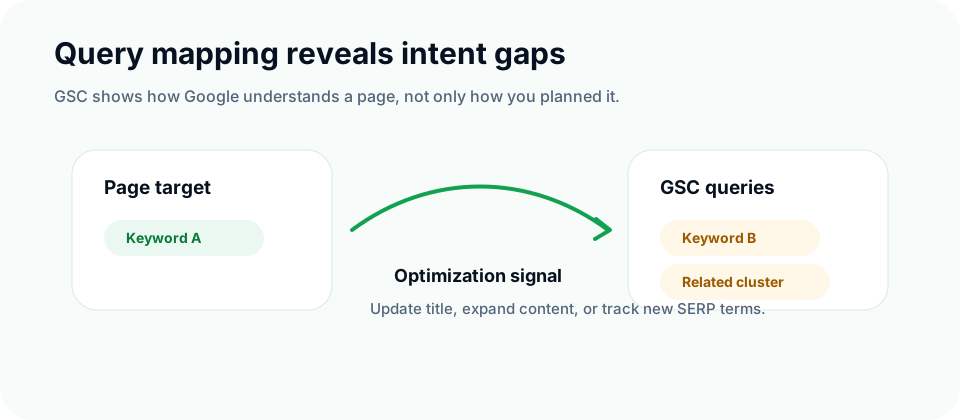
One of the strongest GSC use cases is query mapping. A page may be optimized for one keyword, but Google may associate it with another set of queries.
That difference is not a failure. It is information.
Example
A landing page is created for one target keyword. After GSC data appears, the team sees impressions for a different query cluster. That may mean the page is attracting unexpected search intent, missing important wording, or has an opportunity to expand content in a direction Google already understands.
SEOMER can help turn this into action:
- find pages with unexpected query groups;
- compare target keywords with actual GSC queries;
- identify pages that need title or content adjustments;
- suggest queries worth adding to SERP monitoring;
- connect query changes with page edits and crawler data.
SEO insight
GSC reveals how Google interprets a page. That interpretation is often more useful than the keyword the page was originally written for.
Connecting GSC with website changes
GSC becomes much more useful when teams can compare performance data with real changes on the website.
If impressions increase after a title rewrite, that is useful. If clicks fall after a description change, that is also useful. If a page starts ranking for new queries after content expansion, the team should know what changed and when.
The problem is that many teams track performance and website changes in separate places. SEOMER is designed to connect them.
Useful change signals to compare with GSC
- title changes;
- meta description changes;
- content rewrites;
- new or removed sections;
- internal link changes;
- new pages or removed pages;
- technical changes detected by the crawler.
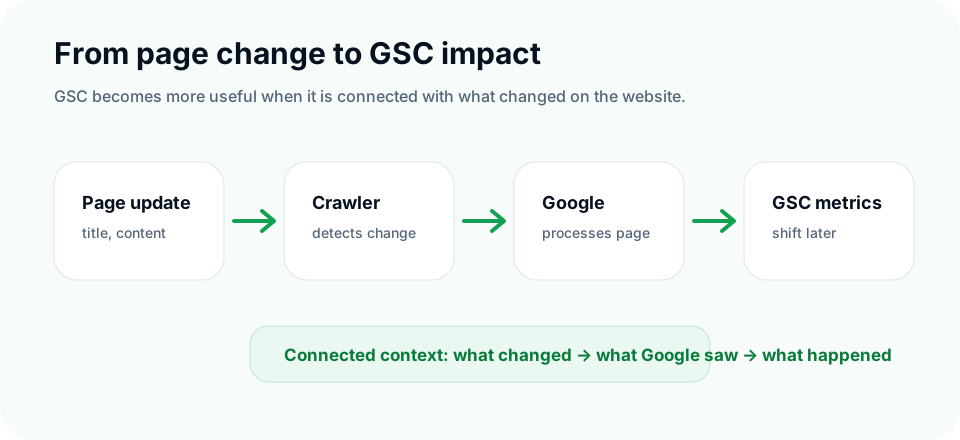
This is where crawler and competitor monitoring becomes important. The crawler sees what changed on the website. GSC shows how Google Search reacted later. Together, they create a timeline that is much easier to understand than isolated metrics.
Crawler and indexation context
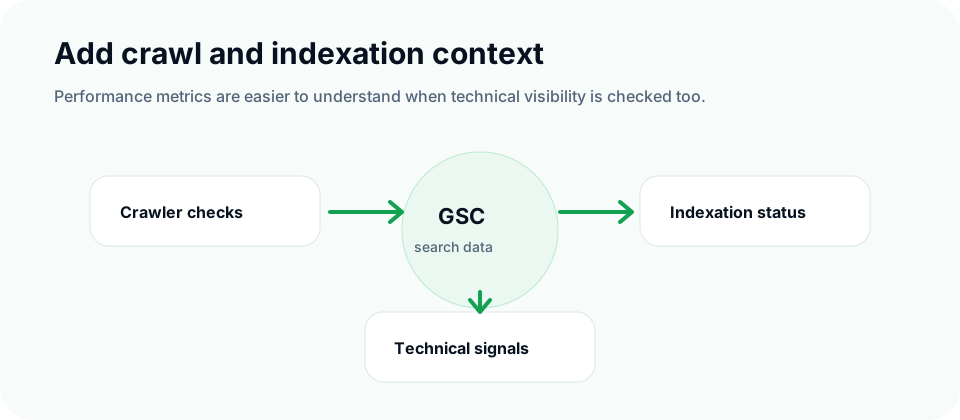
Sometimes the reason for weak GSC performance is not content. It is technical visibility.
A page can be important, but if it is blocked, broken, redirected incorrectly, slow, returning errors or not indexed, GSC performance will not tell the whole story.
What to check alongside GSC
- Is the page crawlable?
- Does it return a valid status code?
- Is it indexed?
- Did it recently disappear or return?
- Are canonical, noindex or redirect signals correct?
- Are important internal links still present?
For historical context, SEOMER can also connect GSC analysis with Web Archive checks. This helps teams compare current performance with previous versions of pages and understand whether content, language, structure or metadata changed over time.
Traffic and behavior context
GSC shows search visibility, but it does not fully explain what users do after clicking. That is why GSC should also be compared with traffic and behavior signals where available.
For example, impressions may increase while clicks stay flat. That could mean the page is visible but the snippet does not attract users. Clicks may increase while conversions stay weak. That could mean intent mismatch or poor landing page experience.
This is where SEO moves from “ranking report” to business analysis.
Examples of useful comparisons
- High impressions + low CTR = title or description problem.
- More clicks + weak engagement = possible intent or UX mismatch.
- GSC visibility drop + stable SERP for main keywords = long-tail loss.
- SERP drop + later GSC drop = ranking movement confirmed by search data.
Common mistake
Many teams open GSC, see a metric change, and jump straight to conclusions. A better workflow is to compare GSC with SERP, crawler, indexation, traffic and page-change data before deciding what caused the movement.
How SEOMER connects everything
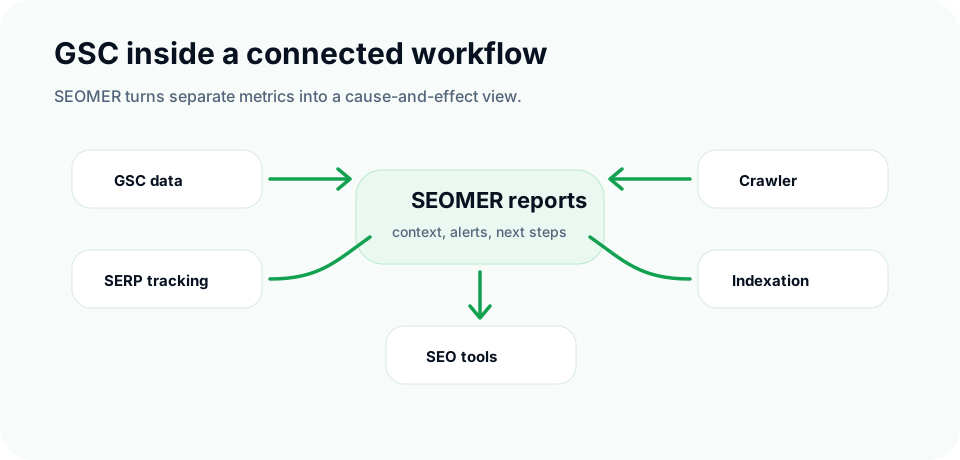
SEOMER uses GSC as one layer inside a connected monitoring system. The goal is not to replace Google Search Console, but to make its data more actionable by surrounding it with the context needed for decisions.
Inside SEOMER, teams can connect:
- Google Search Console dashboard data;
- real-time SERP monitoring;
- crawler and page-change detection;
- indexation checks;
- web archive history;
- uptime and technical monitoring;
- reports and alerts.
A practical connected workflow
- A page is updated: title, description, content or structure changes.
- The crawler detects the change and stores the page state.
- Indexation checks confirm whether Google can keep the page visible.
- SERP monitoring tracks target keywords and competitor movement.
- GSC shows impressions, clicks, CTR and query changes after Google processes the page.
- Reports connect the signals into a readable explanation for the team.
This approach helps teams avoid guessing. Instead of treating GSC as a final answer, they use it as part of a cause-and-effect chain.
SEOMER tip
The value of GSC is not only in clicks and impressions. The real value appears when those metrics are connected with what changed on the website and what changed in search results.
Best practices for using GSC with context
Start with GSC, but do not stop there. Use it to find important pages, query groups and movement patterns. Then validate those patterns with SERP monitoring, crawler data, indexation checks and page-change history.
Do not treat average position as an exact ranking report. It is useful, but it is aggregated. For exact keyword movement, use SERP tracking.
Do not ignore unexpected queries. If Google associates a page with a different topic than expected, that may be a content problem or a new opportunity.
Finally, keep changes visible. If SEO work happens but no one knows what changed and when, GSC analysis becomes much harder than it needs to be.
For the full signal map, read the SEO monitoring guide.
Search Console data becomes actionable only when it is included in a proper SEO report that explains what changed, why it matters and what should be checked next.
For deeper context, combine GSC with log data analysis and the wider SEO monitoring system.
When search performance changes after link movement, the link monitoring guide helps connect backlinks with GSC and SERP data.
When GSC shows discovered or crawled pages that are not indexed, the crawl budget guide can help separate crawl waste from content and indexing issues.
Conclusion
Google Search Console is essential for SEO, but it is not enough by itself. It shows clicks, impressions, CTR and average position, but it does not fully explain the causes behind those numbers.
To make better SEO decisions, GSC data should be compared with SERP movement, website changes, crawler findings, indexation status, web archive history, traffic behavior and reports.
That is the role SEOMER is built to play: connecting GSC with the operational context around a website so teams can understand what happened, why it happened, and what to do next.